
API keys
What you'll learn
How to give scripts, other apps and AI assistants their own key to the REST API, limited to the collections and actions they need.
Before this page: Users & auth and REST API.
A person logs in with a password and gets a session. A script shouldn't use someone's password: give it an API key instead. A key belongs to a user and never does more than that user may, and it can be limited further, e.g. "read and create posts, nothing else".
Turn them on
export default defineConfig({
  // …
  apiKeys: true,
})
This adds an API keys page under Settings in the admin, and a table for them: in production run easy-cms migrate:create api-keys and deploy the migration.
Create a key
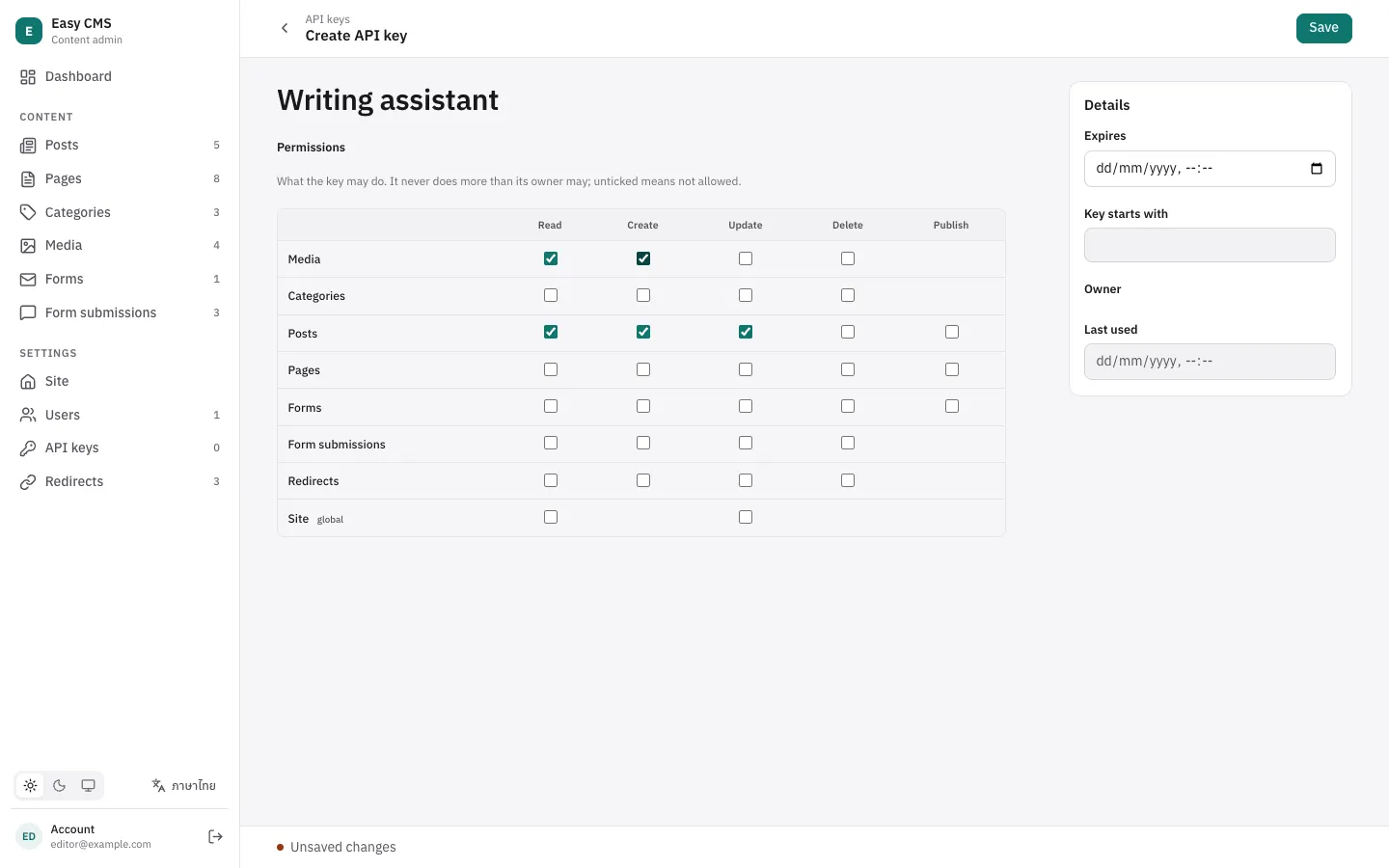
- In the admin, open Settings → API keys and press Create new.
- Give it a name that says who uses it ("Newsletter importer", "Claude").
- Tick what it may do, per collection and global. Ticking create, update, delete or publish also ticks read.
- Optionally set an expiry date, then Save.
The key is shown once, in a dialog: copy it into your app's secret settings or a password manager. Easy CMS stores only a hash, so a lost key can't be shown again: delete it and create a new one.
Keys look like ecms_1a2b3c4d_…. The part after ecms_ is shown in the list as Key starts with, so you can tell keys apart.
Use it
Send the key as a Bearer token. No cookies, no CSRF token:
curl https://example.com/api/cms/posts?draft=true \
  -H "Authorization: Bearer $EASY_CMS_KEY"

curl -X POST https://example.com/api/cms/posts \
  -H "Authorization: Bearer $EASY_CMS_KEY" \
  -H 'content-type: application/json' \
-d '{"title":"Imported"}'| Answer | When |
|---|---|
401 Invalid or expired API key | The key is wrong, deleted, expired, or its owner is deactivated. |
403 This API key may not create "posts" | The key doesn't list that action. |
403 Forbidden | The key lists it, but the owner's access rules don't allow it. |
What a key may do
Each row of the table is a collection or global; each column an action:
| Action | Collections | Globals |
|---|---|---|
| Read | List and read documents, drafts included | Read |
| Create | Create documents; for Media, upload files | — |
| Update | Change documents, read their history, restore versions | Change |
| Delete | Delete documents | — |
| Publish | Publish, unpublish and schedule (collections with drafts) | The same |
- Key and owner both decide. The key narrows what its owner may do; the owner's access rules still apply. An editor's key with "delete" can't delete what editors can't.
- Unticked means not allowed, including collections added later.
- Keys never reach users or other keys. Those collections aren't in the table, and a key can't create keys.
- Saving as a draft needs no publish: a key with create and update but not publish writes drafts that people review and publish.
Manage keys
- Last used shows when the key was last seen (updated at most once a minute).
- Expires: after this time the key answers
401. - Revoke a key by deleting it. It stops working at once.
- Deactivating a user (or deleting them) turns off their keys too.
- Admins see every key; other users see and manage only their own.
In code
Create keys from a script or a seed with the Local API. The key is returned once:
const { key } = await cms.createApiKey({
  name: 'Newsletter importer',
  user: admin.id, // the owner; with { user, overrideAccess: false } it is that user
  permissions: { collections: { posts: ['read', 'create'] } },
  expiresAt: '2027-01-01T00:00:00Z',
})
A request made with a key has its user's apiKey set, so access rules and hooks can tell:
access: {
  // People may delete posts; keys may not, whatever they list.
  delete: ({ user }) => !!user && !user.apiKey,
}
Security
- The secret part is 32 random bytes; Easy CMS stores its SHA-256 hash and compares in constant time.
- Treat keys like passwords: keep them in environment variables or a secrets manager, never in code or the browser.
- Give each app its own key with the fewest permissions, and an expiry when you can. Rotate by creating a new key, switching the app over, then deleting the old one.