
SEO
What you'll learn
Add SEO fields with a search preview to the admin, fill your pages' metadata from them, and publish a sitemap, robots.txt and structured data.
Before this page: Plugins.
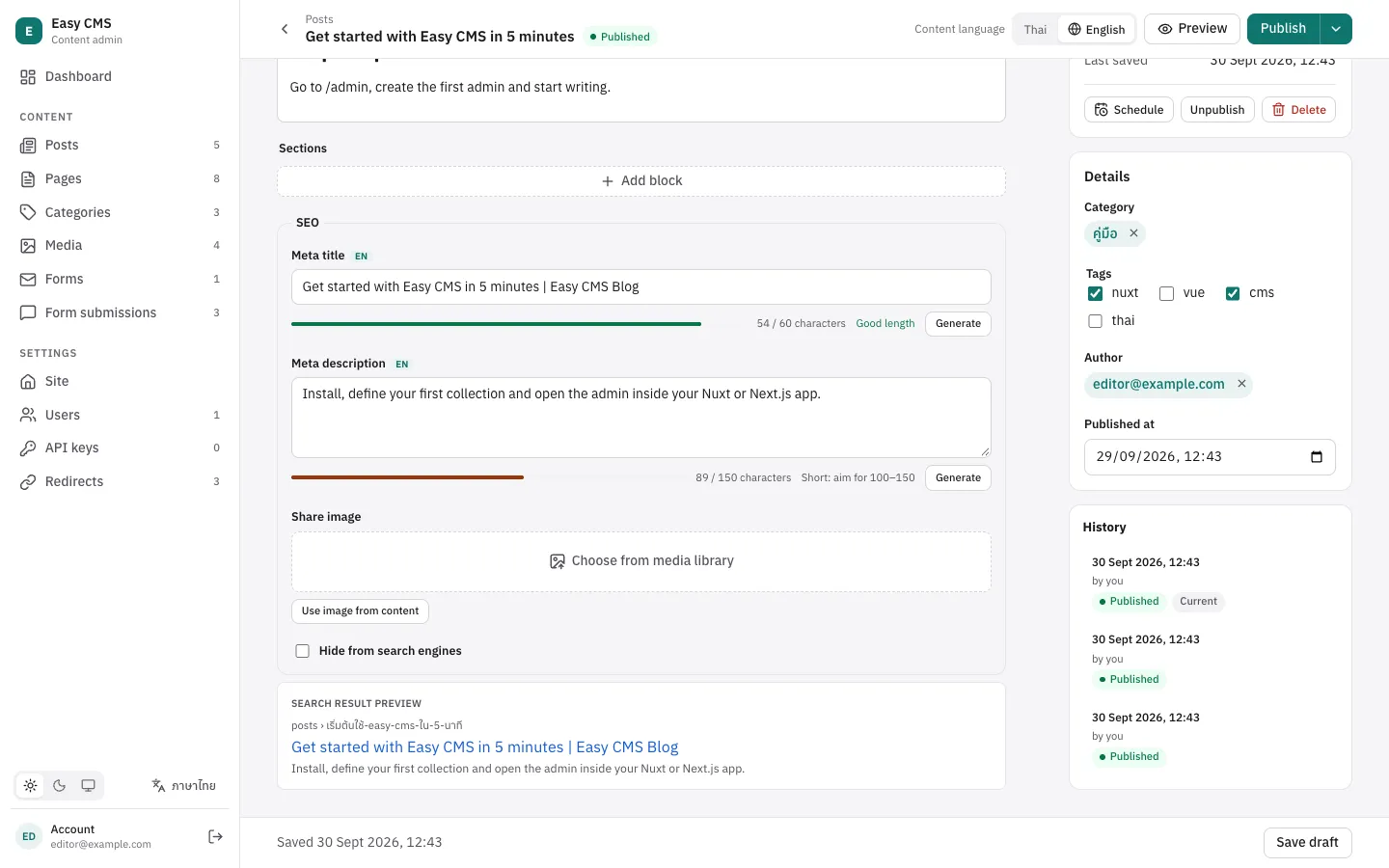
@easy-cms/plugin-seo adds a meta group (title, description, share image) to the collections and globals you choose. Editors see how long each text is, a preview of the search result, and Generate buttons; your pages get their metadata from one function.
npm install @easy-cms/plugin-seopnpm add @easy-cms/plugin-seoyarn add @easy-cms/plugin-seobun add @easy-cms/plugin-seoimport { seoPlugin } from '@easy-cms/plugin-seo'
export default defineConfig({
// …
plugins: [
seoPlugin({
collections: ['posts'],
globals: ['site'],
generateTitle: ({ doc }) => `${doc.title} | My Blog`,
generateDescription: ({ doc }) => doc.excerpt,
generateImage: ({ doc }) => doc.cover,
generateURL: ({ doc }) => `https://example.com/posts/${doc.slug}`,
}),
],
})The group adds columns to the collections' tables: run easy-cms migrate:create seo (see Migrations). Upgrading from 0.16 or earlier? The "Hide from search engines" checkbox is a new column too, so create a migration after updating.
In the admin
- Meta title and Meta description, with a meter: short, good length or too long (50–60 and 100–150 characters by default, counting Thai letters with their marks as one).
- Share image, from the media library.
- Hide from search engines: adds
noindexto the page and leaves it out of the sitemap, for thank-you pages, landing pages for ads and the like. - Generate buttons for each generator you configure. They send the form as it is, unsaved, to your generator on the server, and fill the field.
- Search result preview below the group: the meta title (or the document's title), the address from
generateURLand the description.
Options
| Option | Default | |
|---|---|---|
collections | [] | Collections that get SEO fields. |
globals | [] | Globals that get SEO fields. |
position | 'main' | 'sidebar' puts the group in the edit page's side column. |
generateTitle | — | Suggests a meta title. |
generateDescription | — | Suggests a meta description. |
generateImage | — | Suggests a share image: the id of a media document. |
generateURL | — | The page's address, for the preview and the sitemap. |
autoGenerate | false | Fill empty meta fields with the generators when a document is saved. |
fields | — | (defaults) => fields: change the group's fields, e.g. add a keywords field. |
titleLength | { min: 50, max: 60 } | Length marked as good. |
descriptionLength | { min: 100, max: 150 } | Length marked as good. |
localized | with localization | One value per content locale. |
label | 'SEO' | Label of the group. |
robots | {} | Options of robots.txt for the standalone server, or false for none. |
llms | {} | llms.txt for AI assistants: title, summary, limit, Markdown links. false turns off the standalone server's routes. |
markdown | — | { [slug]: (doc) => markdown }: your own Markdown version of a collection's pages. |
indexNow | — | { key }: tell search engines about changed pages with IndexNow. |
Generators receive { doc, id, locale, collection | global, cms, user } and may be async. Return null when there is nothing to suggest.
generateURL is the page's address
The sitemap, the search preview and the hreflang links all come from generateURL, so give it the real address of each page, per locale when your site has several. Return null for documents that have no page (yet), e.g. without a slug.
generateURL: ({ doc, collection, locale }) =>
  collection === 'posts'
    ? doc.slug ? `/${locale}/posts/${doc.slug}` : null
    : `/${locale}`,
On your pages
seoMeta(doc, options) reads the meta fields, falls back to the document (title, then excerpt or description) and returns the metadata for Nuxt and Next.js: title, description, Open Graph and Twitter tags, noindex, the canonical and hreflang links, and JSON-LD. Fetch the document with depth 1 or more so the share image has its URL.
<script setup lang="ts">
import { seoMeta } from '@easy-cms/plugin-seo'

const route = useRoute()
const locale = route.params.locale as string
const { data: post } = await useFetch(`/api/posts/${route.params.slug}`, { query: { locale } })
const seo = seoMeta(post.value ?? {}, {
  siteUrl: useRequestURL().origin,
  locale,
  locales: ['th', 'en'],
  url: (p, l) => `/${l}/posts/${p.slug}`,
  type: 'article',
})
useSeoMeta(seo.nuxt) // title, description, Open Graph, robots
useHead(seo.head) // canonical and hreflang links, JSON-LD
</script>import { jsonLdScript, seoMeta } from '@easy-cms/plugin-seo'
async function load(slug: string, locale: string) {
const cms = await getEasyCMS(config)
const { docs } = await cms.find('posts', { where: { slug: { equals: slug } }, locale, limit: 1 })
if (!docs[0]) return null
const seo = seoMeta(docs[0], {
config, // admin.siteUrl and the locales
locale,
url: (p, l) => `/${l}/posts/${p.slug}`,
type: 'article',
})
return { post: docs[0], seo }
}
export async function generateMetadata({ params }) {
const { slug, locale } = await params
return (await load(slug, locale))?.seo.next ?? {}
}
export default async function Page({ params }) {
const { slug, locale } = await params
const page = await load(slug, locale)
if (!page) notFound()
return (
<>
<script
type="application/ld+json"
dangerouslySetInnerHTML={{ __html: jsonLdScript(page.seo.jsonLd) }}
/>
<PostView post={page.post} />
</>
)
}| Option | |
|---|---|
siteUrl | The site's address, to make the canonical and image URLs absolute. Default: config.admin.siteUrl, then config.serverURL. |
config | Your Easy CMS config, to read those and localization from. |
url | The page's address, or (doc, locale) => url. As a function it also makes the hreflang links, one per locale plus x-default. |
locale | The page's content locale: og:locale and the canonical address. |
locales, defaultLocale | For hreflang. Default: config.localization. |
type | 'article' for posts: og:type, the published and modified times, and BlogPosting JSON-LD. Default 'website'. |
publishedTime | (doc) => date. Default: publishedAt, then createdAt. |
author | The article's author, or (doc) => name. |
articleType | 'BlogPosting' (default), 'Article' or 'NewsArticle'. |
breadcrumbs | [{ name, url }], top level first: adds BreadcrumbList JSON-LD (breadcrumbList). See Nested pages. |
title, description | (doc) => text: fallbacks when the meta fields are empty. |
siteName | og:site_name. |
It returns title, description, canonical, image, noindex, alternates and jsonLd, plus nuxt (for useSeoMeta), head (for useHead) and next (for generateMetadata).
Sitemap
sitemap(cms) lists every page a visitor can find: documents in the plugin's collections and globals, read without a login (so drafts and anything your read access hides stay out), with an address from generateURL, and not marked "Hide from search engines". Each entry has lastModified (from updatedAt) and, on a site with several locales, the page in every locale. sitemapXml(cms) renders it as XML; over 50,000 addresses it becomes an index of /sitemap.xml?page=1, ?page=2…
import { sitemapXml } from '@easy-cms/plugin-seo'

export default defineEventHandler(async (event) => {
  setHeader(event, 'content-type', 'application/xml; charset=utf-8')
  return sitemapXml(await useEasyCMS(), { page: getQuery(event).page as string | undefined })
})import { getEasyCMS } from '@easy-cms/next'
import { sitemap } from '@easy-cms/plugin-seo'
import config from '@/easy-cms.config'
export const dynamic = 'force-dynamic'
// The entries have the shape of MetadataRoute.Sitemap.
export default async function Sitemap() {
return sitemap(await getEasyCMS(config))
}import { getEasyCMS } from '@easy-cms/next'
import { sitemapXml } from '@easy-cms/plugin-seo'
import config from '@/easy-cms.config'
export const dynamic = 'force-dynamic'
export async function GET(request: Request) {
const page = new URL(request.url).searchParams.get('page')
const xml = await sitemapXml(await getEasyCMS(config), { page })
return new Response(xml, { headers: { 'content-type': 'application/xml; charset=utf-8' } })
}The addresses must be absolute: set admin.siteUrl in the config (or pass { siteUrl }), or return full URLs from generateURL. The plugin also serves the sitemap at <routes.api>/seo/sitemap.xml, and the standalone server at /sitemap.xml.
robots.txt
robotsTxt({ config }) keeps crawlers out of the admin and the API (but not uploaded files, so share images still load) and points them to the sitemap:
User-agent: *
Allow: /api/cms/media/file/
Disallow: /admin/
Disallow: /api/cms/

Sitemap: https://example.com/sitemap.xmlimport { robotsTxt } from '@easy-cms/plugin-seo'
export default defineEventHandler(async (event) => {
setHeader(event, 'content-type', 'text/plain; charset=utf-8')
return robotsTxt({ config: (await useEasyCMS()).config })
})import { robotsTxt } from '@easy-cms/plugin-seo'
import config from '@/easy-cms.config'
export function GET() {
return new Response(robotsTxt({ config }), { headers: { 'content-type': 'text/plain' } })
}| Option | |
|---|---|
config | Your Easy CMS config: the admin and API paths, and admin.siteUrl. |
siteUrl | The site's address for the Sitemap: line, if not admin.siteUrl. |
sitemap | The sitemap's address, or false for no Sitemap: line. |
disallow | More paths to keep out, e.g. ['/search']. |
disallowAll | Keep crawlers out of the whole site, e.g. on staging. |
ai | { training?, search?, user? }: allow or block AI crawlers by group. All allowed by default. |
rules | [{ userAgent, allow?, disallow? }] for other crawlers. |
Staging
disallowAll is not turned on by NODE_ENV: staging servers usually run in production mode too. Set it from your own variable, e.g. disallowAll: process.env.SITE_ENV !== 'production'.
The standalone server serves /robots.txt itself; change it with the plugin's robots option, or turn it off with robots: false.
Structured data (JSON-LD)
Search engines read schema.org data to show richer results.
seoMeta(...).jsonLdis the page's:BlogPosting(orarticleType) withtype: 'article', otherwiseWebPage. Nuxt gets it throughuseHead(seo.head).seoMeta(...).breadcrumbListis aBreadcrumbListfrom thebreadcrumbsoption, so search results can show where the page sits.seo.headhas it too; in Next.js render it likejsonLd.siteJsonLd({ name, url, logo?, sameAs? })is the site'sOrganizationandWebSite: put it in the layout, once per page.jsonLdScript(data)turns either into text for a<script type="application/ld+json">, escaped so content can't close the tag.
// Next.js app/layout.tsx
<script
  type="application/ld+json"
  dangerouslySetInnerHTML={{
    __html: jsonLdScript(siteJsonLd({ name: 'My Blog', url: 'https://example.com' })),
  }}
/>
Check the result with Google's Rich Results Test.
Next steps
- Localization: SEO fields per language.
- AI search: AI crawlers,
llms.txt, Markdown pages and IndexNow. - Get your site ready for search engines: the steps in order, and how to check them.
- Migrations & deployment: migrate the new columns.