
Localization
What you'll learn
Content in several languages: which fields to translate, how editors switch languages, and how pages read a locale.
Before this page: Fields.
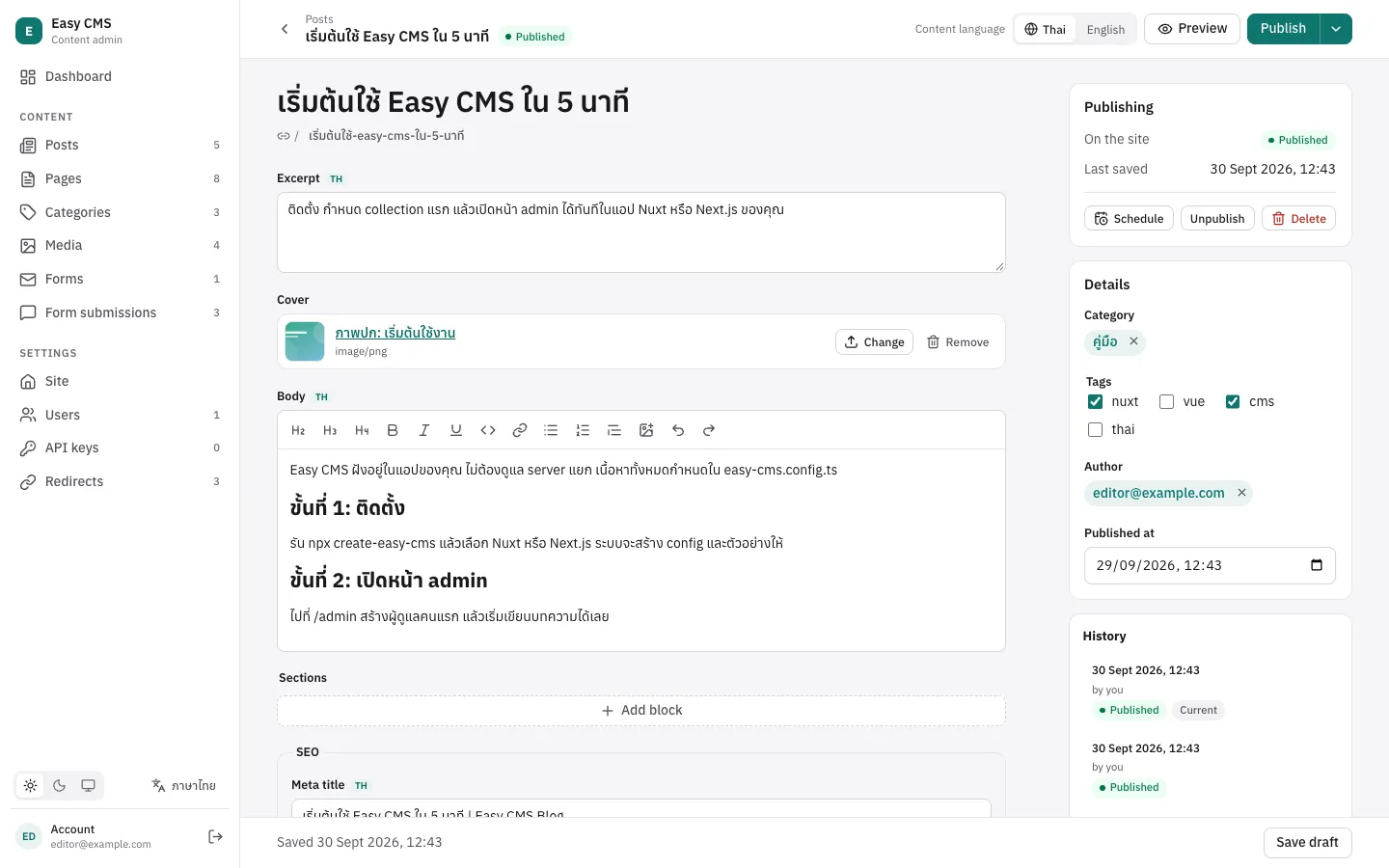
Content in several languages: localized fields hold one value per locale, other fields are shared.
export default defineConfig({
  localization: { locales: ['th', 'en'], defaultLocale: 'th' },
  collections: [
    {
      slug: 'posts',
      fields: [
        { name: 'title', type: 'text', required: true, localized: true },
        { name: 'body', type: 'richText', localized: true },
        { name: 'cover', type: 'upload' }, // the same in every language
      ],
    },
  ],
})| Option | Default | |
|---|---|---|
locales | required | Locale codes, e.g. ['th', 'en'] or ['en', 'en-GB'] |
defaultLocale | the first | Used when no locale is given; its values fill empty ones |
fallback | true | Reads return the default locale's value when a locale's value is empty |
localized: true works on text, textarea, email, slug, rich text, number, boolean, date, JSON, select, upload, relationship (also hasMany), array and blocks fields. A localized array or blocks field holds a whole list per locale; otherwise localize the fields inside it. Groups can't be localized: localize their fields. Fields inside a localized list can't be localized again.
Reading and writing
await cms.find('posts') // default locale
await cms.find('posts', { locale: 'en' }) // English, falling back to Thai when empty
await cms.findById('posts', id, { locale: 'en', fallbackLocale: false }) // empty stays null
await cms.findById('posts', id, { locale: 'all' }) // title: { th: '…', en: '…' }

await cms.update('posts', id, { title: 'Hello' }, { locale: 'en' }) // Thai title kept- Writes set the given locale's values (the default locale when none is given) and keep the other locales.
locale: 'all'writes{ [locale]: value }maps directly. requiredand customvalidateapply to the locale being written.whereandsortuse the locale being read:{ locale: 'en', where: { title: { like: 'x' } } }matches English titles. Name a locale explicitly withtitle.en.- Localized slugs are generated and kept unique per locale; so are
uniquevalues. - Versions keep every locale, and restoring brings them all back.
Over REST add ?locale=en (or all) and ?fallback-locale=false, on reads and writes.
Admin
The edit page of a collection or global with localized fields has a content language switcher; localized fields show the language being edited, and languages a document still needs are marked with a dot. Editing shows empty values for untranslated fields instead of the fallback. Live preview follows the chosen language; preview receives it as locale:
preview: ({ doc, locale }) => `/${locale}/posts/${doc.slug}`Lists show the default language, with a Translations column: a language counts as translated when every localized field filled in the default language is filled in it too.
The admin's own interface language (English or Thai) is separate: each user switches it at the bottom of the menu or on their Account page.
Adding a language
Languages are part of the schema (each localized field gets a column per language), so they are added in the config and deployed with a migration, not from the admin:
- Add the locale code:
localization: { locales: ['th', 'en', 'ja'], defaultLocale: 'th' }. - Run
npx easy-cms migrate:create add-japaneseand review the new*__jacolumns. - Deploy and run
easy-cms migrate.
The admin then shows the new language everywhere, named in the user's interface language (日本語 / Japanese / ญี่ปุ่น); existing documents list it as not translated yet. Removing a language drops its columns and their text: back up first.
Storage
Each localized field gets one column per locale. The default locale keeps the plain column (title), the others add columns (title__en). So:
- Turning
localizedon for an existing field keeps its values as the default locale's. - Localized arrays and
hasManyfields keep their rows in the child table with a_localecolumn; existing rows become the default locale's. - Adding a locale adds columns: create a migration as for any config change.
- Changing
defaultLocalelater moves the values between columns, so every locale keeps its own: the generated migration (and development push) adds the new columns, copies the values withUPDATEstatements, then drops the old ones. Review it before deploying. Migrations created before 0.7 don't record the locales, so for the first change after upgrading, create a migration (easy-cms migrate:create) before changingdefaultLocale.
Next steps
- REST API: the locale parameters of the API.
- Migrations & deployment: migrations when locales change.