
Forms
What you'll learn
Let editors build forms in the admin (contact, sign-up, surveys), collect what visitors send, get an email for each submission, and keep bots out.
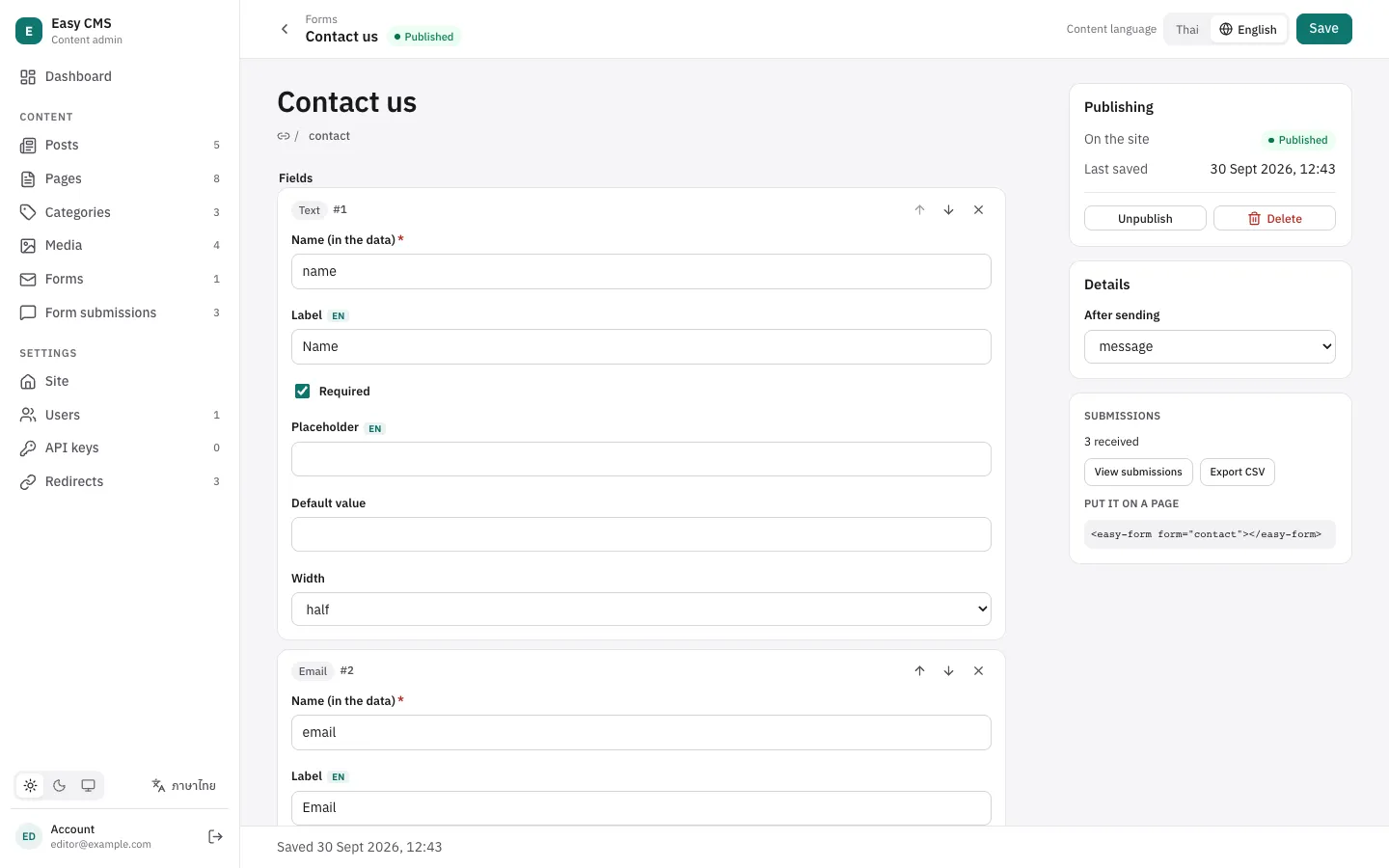
@easy-cms/plugin-form-builder adds Forms to the admin. Editors put fields together from blocks, choose what happens after sending, and who gets an email. Your pages show a form with one element, <easy-form>, or render it themselves from the API.
npm install @easy-cms/plugin-form-builderpnpm add @easy-cms/plugin-form-builderyarn add @easy-cms/plugin-form-builderbun add @easy-cms/plugin-form-builderimport { consoleEmail, defineConfig } from '@easy-cms/core'
import { formBuilderPlugin } from '@easy-cms/plugin-form-builder'
export default defineConfig({
// …
email: consoleEmail(), // or smtp() from @easy-cms/email-smtp: see Email
plugins: [formBuilderPlugin({ defaultTo: 'hello@example.com' })],
})The plugin adds the forms and form-submissions collections: create a migration for them (easy-cms migrate:create forms).
Building a form
A form has:
- Title and slug: the slug (e.g.
contact) is how pages find the form. - Fields, as blocks: text, long text, email, number, phone, choice (a dropdown or radio buttons, one or several), checkbox (e.g. "I agree to the terms"), date, and message (text between fields). Each has a name in the data, a label, whether it is required, a placeholder, a default and a width (full or half a row).
- Submit button label.
- After sending: a message (rich text) or a redirect to another page.
- Emails: who is told about each submission (see below).
Forms have drafts: only a published form accepts submissions, so you can prepare one without it going live. With localization, labels and texts are translated like other content, and visitors get the form in their language.
The form's side panel shows how many submissions it has, links to them, exports them as CSV (with a byte-order mark, so Excel reads Thai text), and gives the snippet for a page.
On your pages
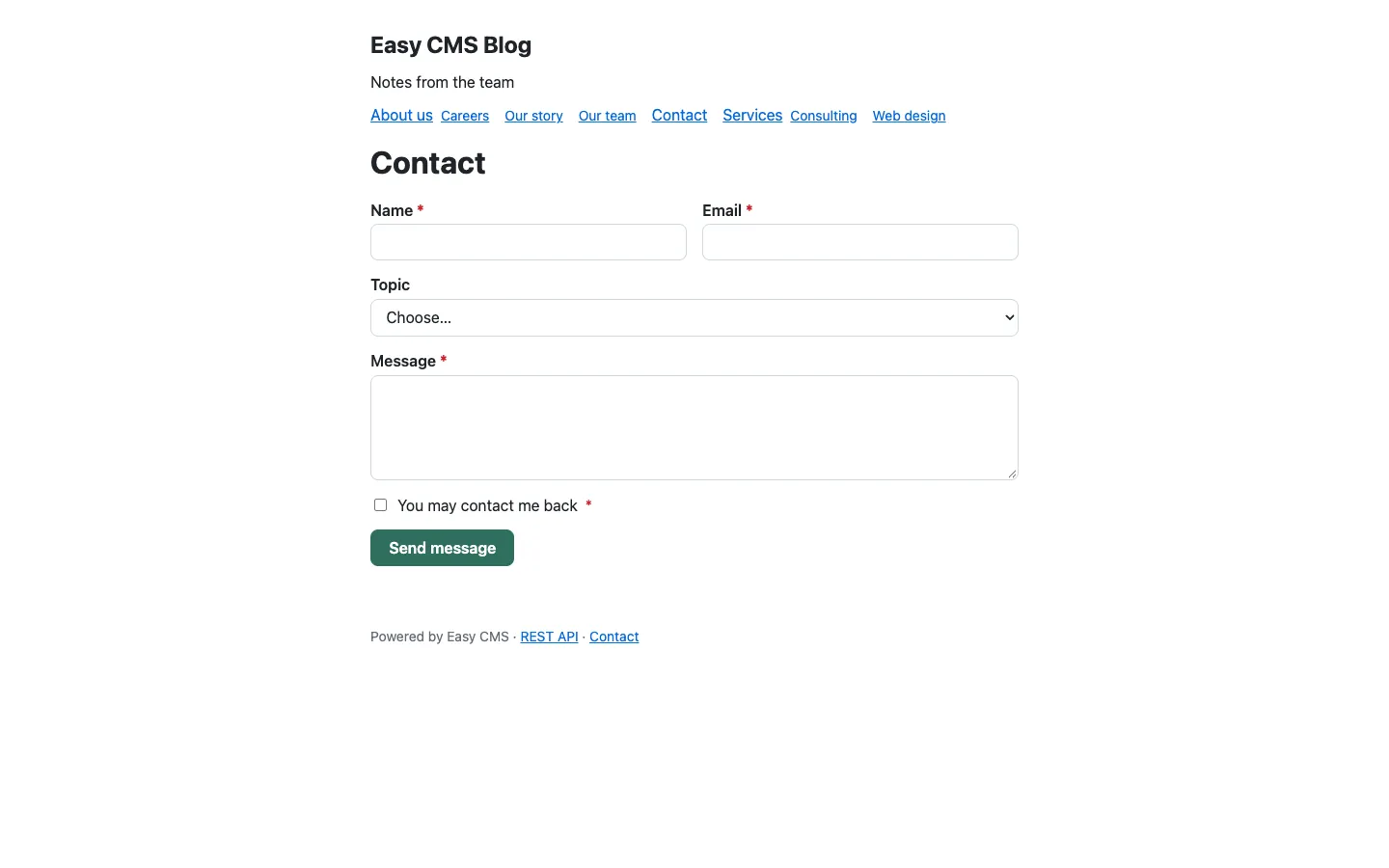
<easy-form> is a Web Component: it loads the form, renders it, checks it with the server and shows the confirmation. It renders in the light DOM, so your site's CSS styles it (classes easy-form__field, easy-form__input, easy-form__error…); element.css has optional defaults.
import '@easy-cms/plugin-form-builder/element'
import '@easy-cms/plugin-form-builder/element.css'

export default defineNuxtPlugin(() => {})

// nuxt.config.ts: vue: { compilerOptions: { isCustomElement: (tag) => tag === 'easy-form' } }
// In a page: <ClientOnly><easy-form form="contact" /></ClientOnly>'use client'
import { useEffect } from 'react'
import '@easy-cms/plugin-form-builder/element.css'
export function EasyForm({ form }: { form: string }) {
useEffect(() => {
void import('@easy-cms/plugin-form-builder/element')
}, [])
return <easy-form form={form} />
}<!-- The CMS serves the element too, for static sites and other frameworks. -->
<script type="module" src="https://cms.example.com/api/cms/form/element.js"></script>
<easy-form form="contact" api="https://cms.example.com/api/cms"></easy-form>| Attribute | Default | |
|---|---|---|
form | — | The form's slug. |
api | /api/cms | The REST API, when the CMS is on another server. |
locale | the page's lang | The content locale, when it is one of yours. |
It fires easy-form:submitted (event.detail.confirmation) and easy-form:error (event.detail.errors), e.g. for analytics.
A page on another origin (the standalone setup) needs its origin in cors: submissions carry no cookies, so no auth.trustedOrigins entry is needed.
Rendering it yourself
@easy-cms/plugin-form-builder/client has the same API without the element, for your own components:
import { getForm, submitForm } from '@easy-cms/plugin-form-builder/client'

const form = await getForm('contact', { api: '/api/cms', locale: 'th' })
// form.fields: [{ kind, name, label, required, placeholder, options… }]

const result = await submitForm(
  'contact',
  { data: { name, email, message }, token: form.token, [form.honeypot]: '' },
  { api: '/api/cms' },
)
if (result.ok) show(result.confirmation) // { type: 'message', html } or { type: 'redirect', url }
else showErrors(result.errors) // [{ field?, message }]
Send token back as you got it, and the honeypot field empty (see spam). Behind the client are GET <api>/form/:slug and POST <api>/form/:slug/submit.
Emails
Each form has a list of emails sent for every submission. In the subject and message, {{name}} is a field's value and {{*}} a table of all fields.
- To is a list of addresses, comma separated. Leave it empty for the plugin's
defaultTo. - Reply to can be
{{email}}, so replying reaches the person who sent the form. - To
{{email}}sends a confirmation to that person. Such an email can repeat only short fields (no long text, no{{*}}), each cut at 100 characters: otherwise anyone could use the form to send any text to any address.
Emails go through the config's email adapter, queued and retried if sending fails. They are in the language the visitor used.
Spam
Public forms attract bots. These are always on:
- A honeypot: a hidden field people don't see and bots fill in.
- A minimum time: a form sent less than 2 seconds after it loaded (
minSubmitTime) is a bot. - A rate limit: 5 submissions per 10 minutes per visitor and form (
rateLimit). Visitors are told by IP address, kept only as a hash that changes every window.
Caught bots get the same "thank you" as people, and nothing is stored, so they don't learn to get around the checks.
For more, turn on Cloudflare Turnstile, a privacy-friendly check that usually needs no clicks:
formBuilderPlugin({
  turnstile: {
    siteKey: process.env.TURNSTILE_SITE_KEY,
    secretKey: process.env.TURNSTILE_SECRET_KEY,
  },
})
<easy-form> then loads Cloudflare's script: add https://challenges.cloudflare.com to script-src and frame-src if your site has a Content Security Policy.
Privacy
Submissions keep the values, the page and the language, not the IP address. Delete old ones automatically with retentionDays, e.g. retentionDays: 365. Tell visitors on the form what you collect and why (a message field works well), as PDPA and GDPR ask.
Only logged-in users read submissions, and only admins delete them. Nobody creates them through the REST API: they come only from the form's endpoint, after validation and the spam checks.
Options
| Option | Default | |
|---|---|---|
defaultTo | — | Recipients of emails whose "To" is empty. |
defaultFrom | the adapter's from | Sender of emails that set none. |
fields | all | Field types editors can use, e.g. ['text', 'email', 'textarea']. |
rateLimit | { max: 5, window: 600 } | Submissions per visitor and form per window seconds, or false. |
minSubmitTime | 2000 | Milliseconds before a submission counts as a person's. |
turnstile | — | { siteKey, secretKey } for Cloudflare Turnstile. |
retentionDays | — | Delete submissions older than this. |
slugs | forms, form-submissions | { forms, submissions }: the collections' slugs. |
More with what's built in
- Webhooks: a webhook with
collections: ['form-submissions']andevents: ['create']sends each submission to Slack, LINE, n8n or your CRM. - AI assistants: with the MCP plugin and an API key that may read
form-submissions, an assistant can summarize this week's messages.