
Nested pages
What you'll learn
Put pages inside pages (About → Team → Alice), give each its full address (/about/team) and its breadcrumbs, and keep them right when a page above moves or changes its slug.
Before this page: Plugins.
Sites have sections: an About page with Team and History under it, docs with chapters and sections. @easy-cms/plugin-nested-docs lets each document have a parent in the same collection, and keeps two values up to date for your pages:
- Path: the page's full address from the slugs of the pages above it, e.g.
/about/team. - Breadcrumbs: the trail from the top-level page down to the page itself, each step with its label and path, e.g. About (
/about) › Team (/about/team).
npm install @easy-cms/plugin-nested-docspnpm add @easy-cms/plugin-nested-docsyarn add @easy-cms/plugin-nested-docsbun add @easy-cms/plugin-nested-docsimport { nestedDocsPlugin } from '@easy-cms/plugin-nested-docs'
export default defineConfig({
// …
collections: [
{
slug: 'pages',
useAsTitle: 'title',
drafts: true,
fields: [
{ name: 'title', type: 'text', required: true },
{ name: 'slug', type: 'slug', from: 'title' },
{ name: 'body', type: 'richText' },
],
},
],
plugins: [nestedDocsPlugin({ collections: ['pages'] })],
})The plugin adds three fields to each collection: parent, path and breadcrumbs. Create a migration for them (easy-cms migrate:create nested-pages, see Migrations).
In the admin
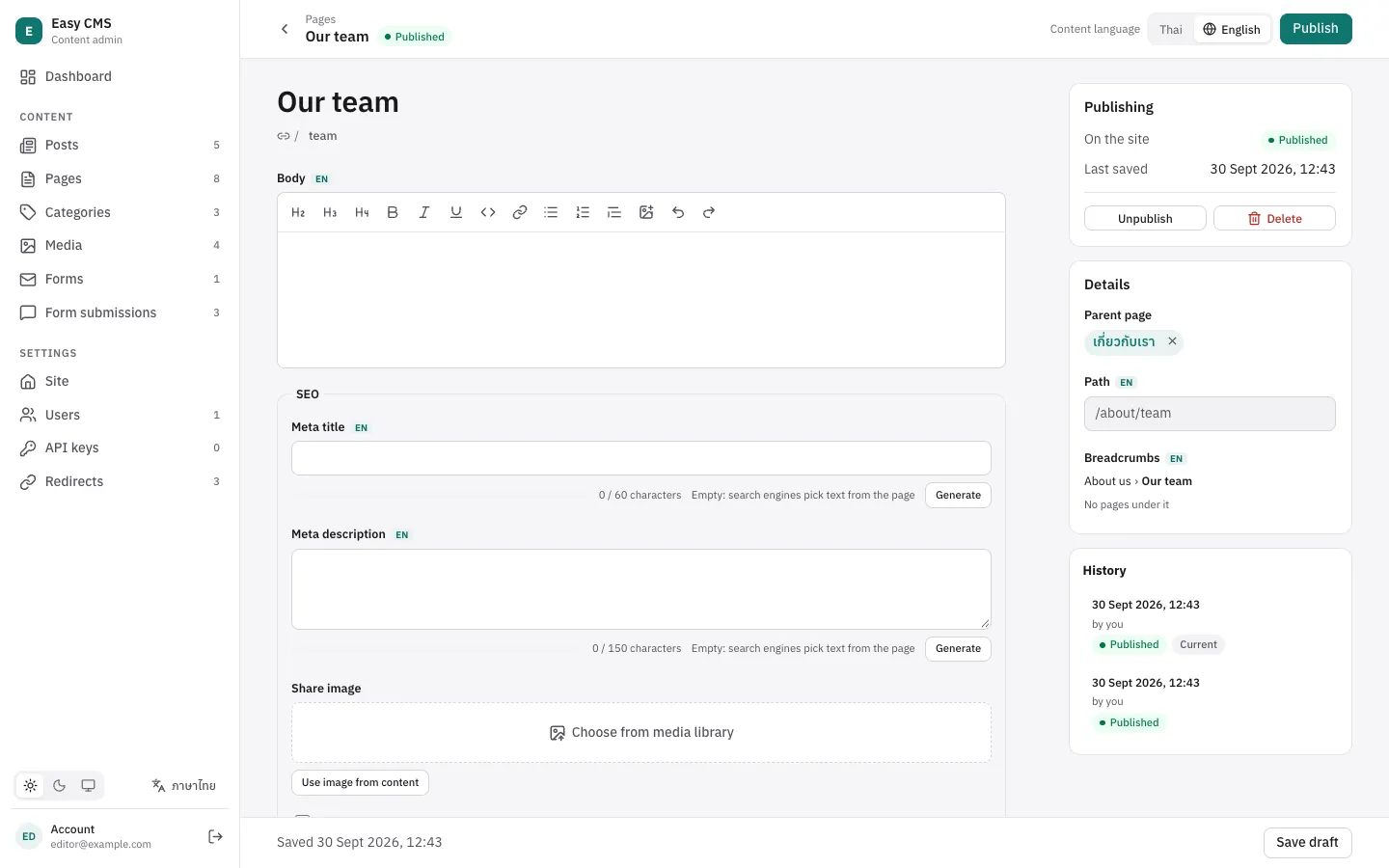
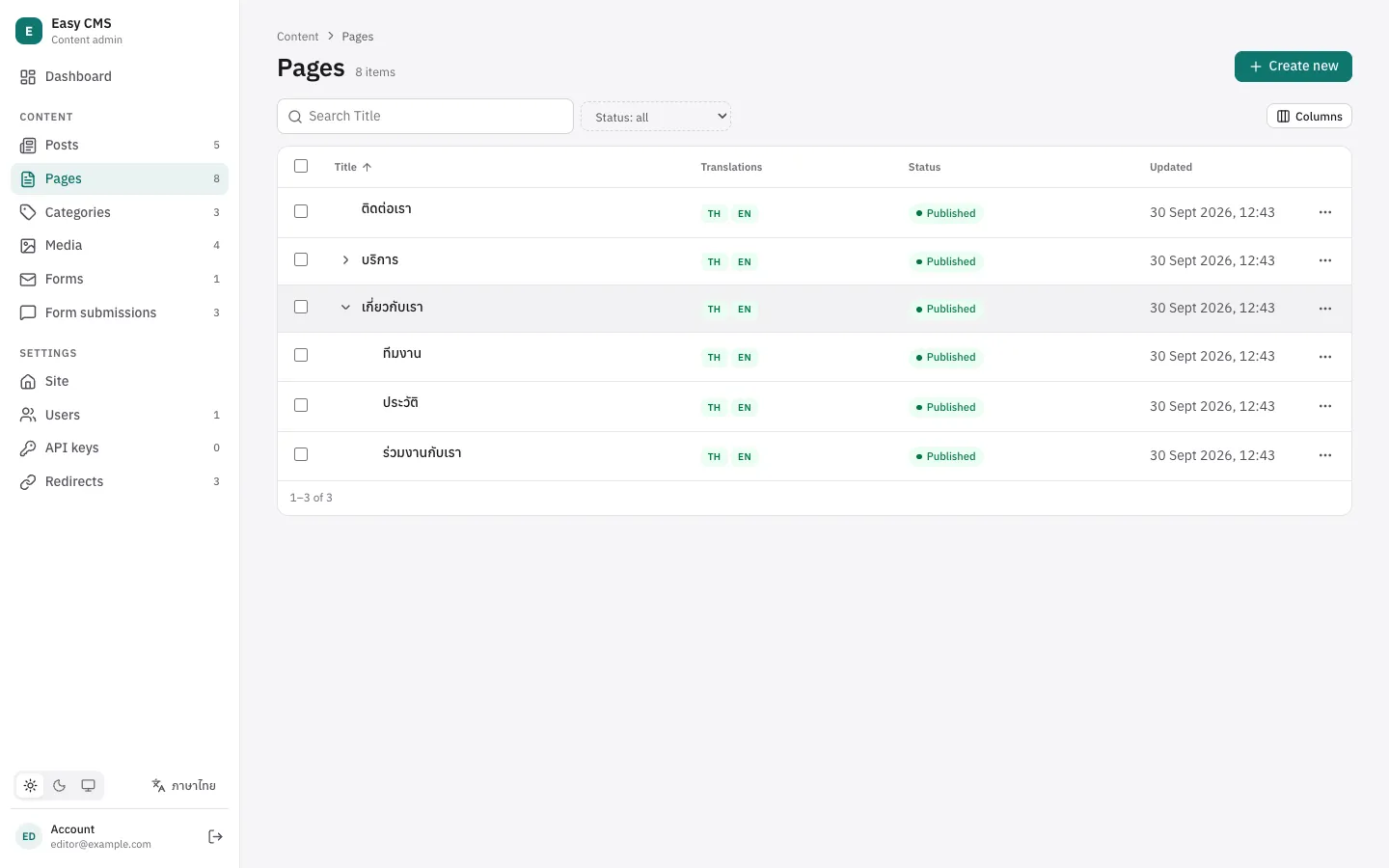
- The list is a tree. Top-level pages come first; the arrow next to a page shows the pages under it. Searching or filtering lists the matching pages flat.
- Parent page is in the side panel. It only offers pages that make sense: never the page itself or a page under it, which would make a loop.
- The side panel shows the page's path and where it sits, and how many pages are under it, with a link to them.
Slugs only need to differ among pages with the same parent: /about/team and /careers/team can both be team.
Showing a page by its address
A page's address on your site is up to you: /about/team, or /p/about/team to keep it apart from your other routes. Take your prefix off and look the rest up with findByPath:
import { findByPath } from '@easy-cms/plugin-nested-docs'

export default defineEventHandler(async (event) => {
  const cms = await useEasyCMS()
  const page = await findByPath(cms, 'pages', String(getQuery(event).path))
  if (!page) throw createError({ statusCode: 404 })
  return page
})import { getEasyCMS } from '@easy-cms/next'
import { findByPath } from '@easy-cms/plugin-nested-docs'
import { notFound } from 'next/navigation'
import config from '@/easy-cms.config'
export default async function Page({ params }: { params: Promise<{ path: string[] }> }) {
const cms = await getEasyCMS(config)
const page = await findByPath(cms, 'pages', `/${(await params).path.join('/')}`)
if (!page) notFound()
return <h1>{String(page.title)}</h1>
}// Any frontend: the path is an ordinary field.
const { docs } = await fetch(
`/api/cms/pages?where[path][equals]=${encodeURIComponent('/about/team')}&limit=1`,
).then((r) => r.json())findByPath takes the same options as find (locale, draft, depth, user and overrideAccess), and decodes the address, so /%E0%B8%97%E0%B8%B5%E0%B8%A1 finds /ทีม.
Breadcrumbs
Each page has its trail in breadcrumbs, top level first and the page last:
<nav aria-label="Breadcrumb">
  <ol>
    <li v-for="(crumb, i) in page.breadcrumbs" :key="crumb.id">
      <NuxtLink v-if="i < page.breadcrumbs.length - 1" :to="`/p${crumb.url}`">{{ crumb.label }}</NuxtLink>
      <span v-else aria-current="page">{{ crumb.label }}</span>
    </li>
  </ol>
</nav>
A step is { doc, label, url }: the page's id, its title (useAsTitle) and its path.
Menus
getTree gives the published pages as a tree, for a menu or a docs sidebar:
import { getTree } from '@easy-cms/plugin-nested-docs'

const menu = await getTree(cms, 'pages', { depth: 2, locale: 'en' })
// [{ id, title, slug, path, children: [{ id, title, slug, path, children: [] }] }, …]
Pages come in the list's order: admin.list.sort if you set it (e.g. order, a number field you add), else by title. A page under an unpublished page is left out with it.
Frontends on another server get the same from GET /api/cms/tree/pages?depth=2&locale=en, with the collection's read access.
When pages move
When a page gets a new slug or parent, the plugin saves the pages under it with their new paths and breadcrumbs, level by level.
- Drafts don't move anything: paths change when the page is published. A page under it that has a pending draft keeps the draft, and its live version gets the new path.
- Deleting a page that has pages under it is refused: move or delete them first. With
onDeleteParent: 'orphan'they move to the top level instead (and their addresses change). - Old addresses: with the redirects plugin and the same address function, every page that moved gets a redirect from its old address, the pages under a moved page too.
const pageURL = (doc) => (doc.path ? `/p${doc.path}` : null)

plugins: [
  nestedDocsPlugin({ collections: ['pages'] }),
  redirectsPlugin({ collections: ['pages'], url: ({ doc }) => pageURL(doc) }),
  seoPlugin({ collections: ['pages'], generateURL: ({ doc }) => pageURL(doc) }),
]
For search results that show where a page sits, pass the breadcrumbs to the SEO plugin's seoMeta, which adds BreadcrumbList JSON-LD:
const seo = seoMeta(page, {
  url: (p) => pageURL(p),
  breadcrumbs: page.breadcrumbs.map((b) => ({ name: b.label, url: `/p${b.url}` })),
})
Localization
When the slug is localized, every language has its own path and breadcrumbs: /about/team in English, /เกี่ยวกับ/ทีม in Thai. The parent is shared: a site has the same sections in every language. Pass the locale to findByPath and getTree.
Pages that existed before the plugin
Adding the plugin to a collection that has pages leaves their paths empty until they are saved. Work them all out at once:
npx easy-cms nested:rebuildpnpm exec easy-cms nested:rebuildyarn easy-cms nested:rebuildbunx easy-cms nested:rebuildIt also repairs pages after an error, and moves pages whose parent was deleted to the top level. rebuildNestedDocs(cms, 'pages') does the same from code. A collection that already has a parent relationship to itself keeps it.
Options
| Option | Default | |
|---|---|---|
collections | — | Collections whose documents can have a parent in the same collection. |
slugField | slug | The field each page adds to its parent's path (a slug or text field). |
titleField | useAsTitle | The field shown in breadcrumbs. |
fields | parent, breadcrumbs, path | { parent, breadcrumbs, path }: the added fields' names. |
maxDepth | 10 | Levels of pages, the top level included. |
onDeleteParent | restrict | restrict or orphan: deleting a page with pages under it. |
Built on core features
The plugin uses parts of Easy CMS that your own collections can use too:
admin: { list: { tree: 'parent' } }: a tree list along a relationship to the same collection;list.sortsets the list's default order. See Configuration.filterOptionson a relationship: which documents it may point to. See Fields.uniqueWithinon a slug: unique only among documents with the same value of another field.update(…, { live: true })in the Local API: upkeep of the live version that leaves a pending draft pending and adds no version.commandsin the config:easy-cms <name>commands from plugins. See CLI.