
Redirects
What you'll learn
Send visitors (and search engines) from old addresses to new ones: redirects editors manage in the admin, and automatic ones when a page's address changes.
Before this page: Plugins.
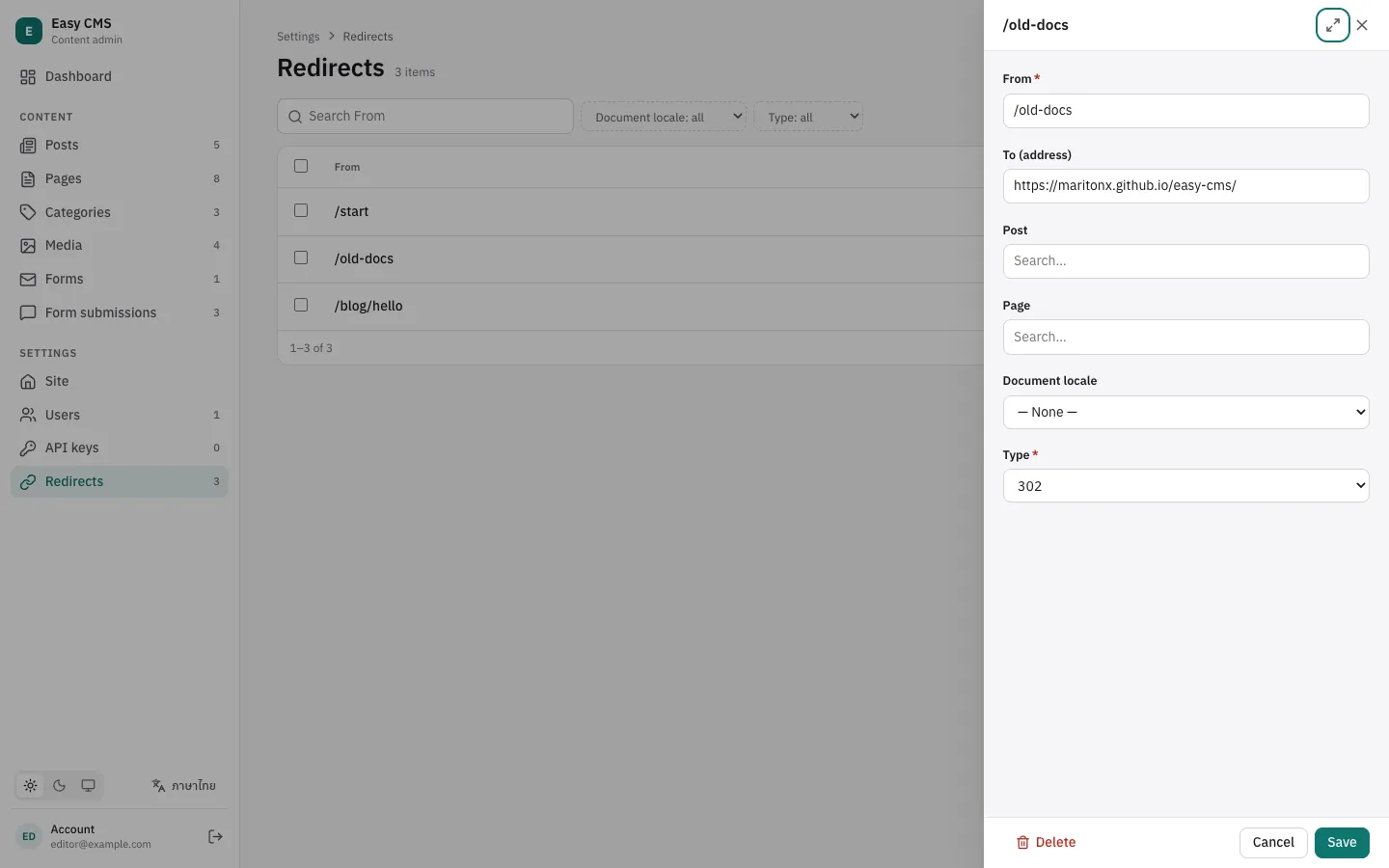
When a page moves, its old address should answer with a 301 to the new one: visitors and old links keep working, and search engines move the page's ranking to the new address instead of dropping it. @easy-cms/plugin-redirects adds a Redirects list under Settings in the admin, and adds a redirect by itself when a published post's slug changes.
npm install @easy-cms/plugin-redirectspnpm add @easy-cms/plugin-redirectsyarn add @easy-cms/plugin-redirectsbun add @easy-cms/plugin-redirectsimport { redirectsPlugin } from '@easy-cms/plugin-redirects'
// One function for a post's address, shared with the SEO plugin's generateURL.
const postURL = (doc) => (doc.slug ? `/posts/${doc.slug}` : null)
export default defineConfig({
// …
plugins: [
redirectsPlugin({
collections: ['posts'], // redirects may point to posts, and follow them
url: ({ doc }) => postURL(doc),
}),
],
})The plugin adds a redirects collection: create a migration for it (easy-cms migrate:create redirects, see Migrations).
In the admin
Each redirect has:
- From: the old path, e.g.
/old-page. The query string and a trailing slash are ignored. - To (address): a path on the site or a full URL, or a document from
collections. A redirect to a document always goes to its current address, even after it moves again. - Type:
301(moved for good, the default),302or307(for now),308(for good, keeping the method).
Redirects open in a drawer over the list, like other small collections. With the MCP plugin, an assistant can manage them too, when its API key allows.
When an address changes
With collections and url, a published document whose address changes gets a redirect from the old address to the document, in every locale:
- Only live pages: saving a draft, or renaming a page that was never published, adds nothing.
- No chains: the redirect points to the document, so after a second rename both old addresses go straight to the newest one.
- No loops: renaming a page back to an old address removes the redirect from that address.
Turn it off with autoRedirect: false, or give a list of collections.
Serve them
resolveRedirect(cms, url) returns { location, status } for a path, or null. Redirects are read once and kept in memory, so it is cheap to call on every request. Changes apply at once on the server that made them; other servers (serverless instances) catch up within cacheTTL (60 seconds by default). The visitor's query string is kept.
import { resolveRedirect } from '@easy-cms/plugin-redirects'

export default defineEventHandler(async (event) => {
  const url = getRequestURL(event)
  if (/^\/(_nuxt|api|admin)(\/|$)/.test(url.pathname)) return
  const redirect = await resolveRedirect(await useEasyCMS(), url)
  if (redirect) return sendRedirect(event, redirect.location, redirect.status)
})import { getEasyCMS } from '@easy-cms/next'
import { resolveRedirect } from '@easy-cms/plugin-redirects'
import { type NextRequest, NextResponse } from 'next/server'
import cmsConfig from './easy-cms.config'
// The proxy (formerly middleware) runs on Node.js, so it can use the Local API.
export async function proxy(request: NextRequest) {
const redirect = await resolveRedirect(await getEasyCMS(cmsConfig), request.nextUrl)
if (redirect)
return NextResponse.redirect(new URL(redirect.location, request.url), redirect.status)
}
export const config = { matcher: ['/((?!api/|admin|_next/|favicon.ico).*)'] }// GET <routes.api>/resolve-redirect?path=/old-page
// 200 { "location": "/new-page", "status": 301 }, or 404
const response = await fetch(`${CMS}/api/cms/resolve-redirect?path=${encodeURIComponent(path)}`)
if (response.ok) {
const { location, status } = await response.json()
// send the redirect with your framework or host
}On Next.js 15, middleware runs on the Edge runtime by default, where the Local API doesn't run: set export const config = { runtime: 'nodejs', matcher: [...] } (Next.js 15.5 and later), or look the path up in your not-found page and call permanentRedirect().
Options
| Option | Default | |
|---|---|---|
collections | [] | Collections a redirect can point to; their pages get automatic redirects. |
url | — | ({ collection, doc, locale }) => address: a document's address. Needed with collections. |
autoRedirect | true | Add redirects when a published page's address changes; false, or a list of collections. |
slug | 'redirects' | Slug of the redirects collection. |
cacheTTL | 60000 | How long other servers keep redirects in memory, in ms. |
Next steps
- SEO: the sitemap lists pages at their new addresses.
- Configuration: put your own collections under Settings with
admin: { group: 'settings' }.