
Live preview
What you'll learn
Show editors the real page next to the form, updated as they type, before saving.
Before this page: Drafts, versions & scheduling.
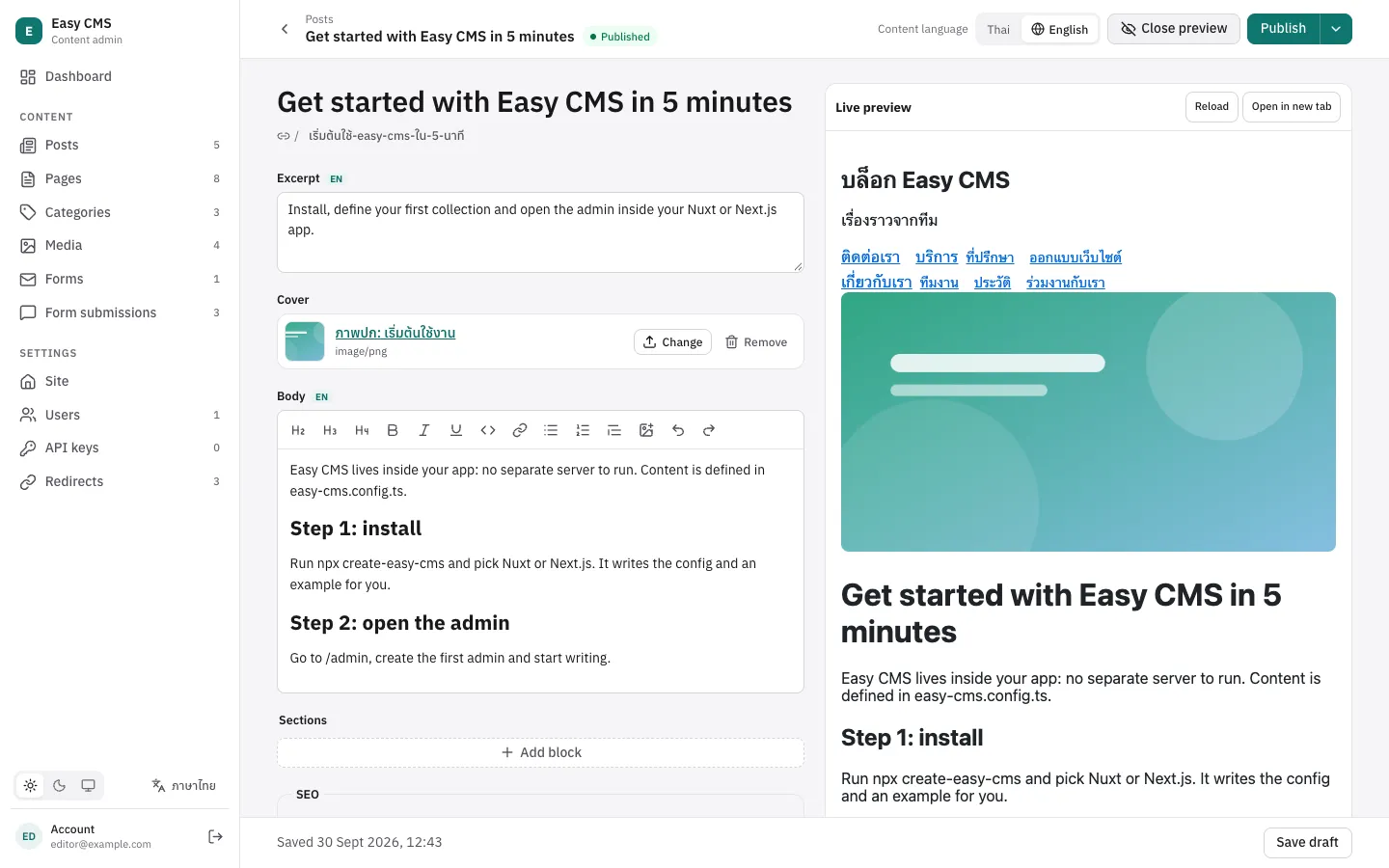
Editors see the real page next to the form, updated as they type, before anything is saved.
{
  slug: 'posts',
  preview: ({ doc }) => (doc.slug ? `/posts/${doc.slug}` : null),
  fields: [/* … */],
}
preview returns the page that shows a document: a path on the site or an absolute URL, or null when it has no page. Globals take the same option. The admin then shows a Preview button; the page opens in a frame beside the form.
How it works
- The admin loads the page from
previewonce. - On every change it sends the form to the server (
POST /:collection/:id/preview), which returns the document as a normal read would: relationships and uploads populated,afterReadhooks applied. Nothing is saved. - The admin posts that document to the page with
postMessage; the page renders it.
So the page has to render from the document it receives. The helpers below do the wiring.
Nuxt
useLivePreview is auto-imported. Give it the ref that holds the document:
<script setup lang="ts">
import { renderRichText } from '@easy-cms/richtext'

const { data: post } = await useFetch(`/api/posts/${useRoute().params.slug}`)
useLivePreview(post)
const html = computed(() => renderRichText(post.value?.body))
</script>
Next.js
Load in a Server Component, render in a Client Component with useLivePreview:
'use client'
import { useLivePreview } from '@easy-cms/next/live-preview'

export function PostView({ post: initial }: { post: Post }) {
  const post = useLivePreview(initial)
  return <h1>{post.title}</h1>
}
Any frontend
import { subscribeLivePreview } from '@easy-cms/core/live-preview'

const stop = subscribeLivePreview((doc) => render(doc), {
  origin: 'https://cms.example.com', // the admin's origin; default: the page's own
})
Outside the admin's frame the helpers do nothing, so they can stay in production code.
Preview tokens
When the admin opens the preview, it adds easy-cms-preview=<token> to the URL. The token opens one document's current draft (or one global) for an hour, without a login, so a frontend on another origin can show drafts that were never published:
import { getPreviewToken } from '@easy-cms/core/live-preview'

const token = getPreviewToken() // from ?easy-cms-preview=, or null
const post = await fetch(
  `${api}/posts/${id}?depth=2${token ? `&preview=${token}` : ''}`,
).then((r) => r.json())
Put the document id in the preview URL for this, e.g. preview: ({ doc }) => \https://www.example.com/preview/posts/${doc.id}\``.
On the server, cms.verifyPreviewToken(token) returns what a token opens ({ collection, id } or { global }) or null, and cms.createPreviewToken({ collection, id }) creates one, e.g. for a "share preview link" button.
Things to know
- Render rich text on the client too (
renderRichTextfrom@easy-cms/richtextworks in the browser), since the document carries the rich text JSON. - With the Nuxt and Next adapters, the page and the admin share an origin and the editor's session, so a page that reads drafts for logged-in users (as the examples do) needs no token.
- A preview token only opens the document it was made for, expires after an hour, and is refused when tampered with. Treat preview URLs like a temporary share link.
- Only users who may update a document (or create one, for new documents) can preview it.
Next steps
- Localization: preview each language.
- SEO: preview search results too.