
Roles from the admin
What you'll learn
How admins add roles and tick what each one may do, per collection, global and admin page, without writing code.
Before this page: Access control, Users & auth.
Turn it on in the config:
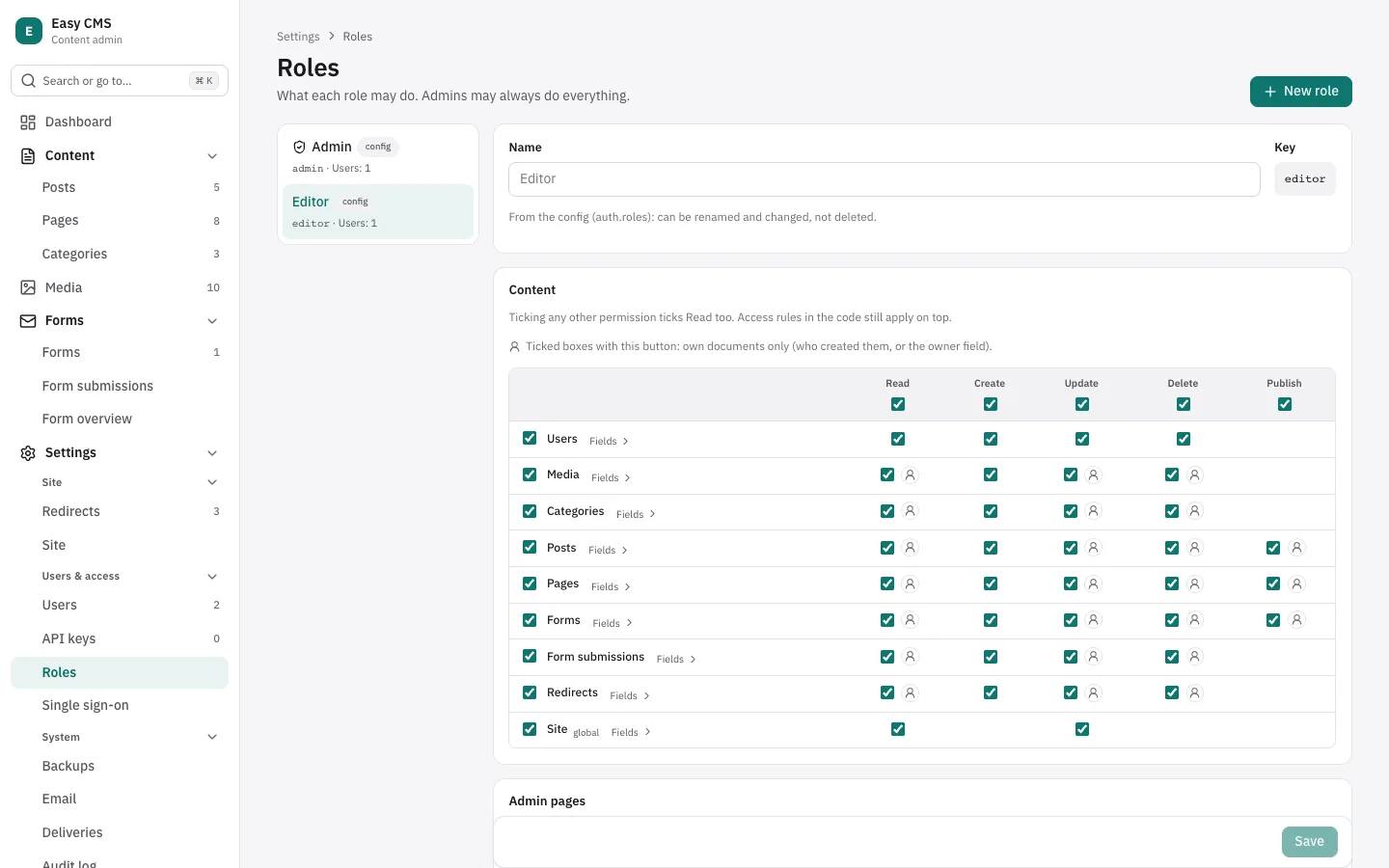
auth: { rbac: true },Admins then find Settings → Roles in the admin. They can add roles (an editor team, a reviewer, a translator…), copy one to start from, rename them, and tick what each may do:
- Content: each collection and global against Read, Create, Update, Delete and Publish (Publish only with drafts). Ticking anything else ticks Read too; a whole row or column can be ticked at once. Create on Media means uploading.
- Admin pages: the system status on the dashboard, Deliveries, and the pages and dashboard panels of plugins. Backups, Email and Roles stay with admins: a backup holds the whole database, and Email sends mail from the site.
Users are given a role on their page under Settings → Users. Changes apply on the next request. Each role keeps a history of who changed it and when.
How it works with access rules
A user may do something when both their access rules and their role allow it. The rules in your code stay the outer limit, so a rule like "authors edit their own posts" keeps working, and a role can only narrow what the code allows.
- Admins (
role: 'admin') may always do everything. Their role can't be changed or deleted. - Visitors who aren't logged in are left to access rules alone:
read: () => truestays public. - Everyone sees and edits their own account (Account page), whatever their role. A role with Read or Update on Users gives more: the other users. A user's
rolecan still be changed only by admins. - API keys can do no more than their owner's role, now and after the role changes. The admin only offers what the owner may do.
- Checks run on the server, for the REST API, the MCP server and the Local API with
overrideAccess: false. The admin hides what a role can't do, and its main button saves a draft for roles without Publish.
Roles in the config
The roles in auth.roles always exist. They can be renamed and their permissions changed, but not deleted, since your code may check them (user.role === 'editor'). Roles added in the admin can be deleted once no user has them.
When roles are first turned on, every role in auth.roles gets everything it could do before: every collection and global, and the plugin pages and panels. The system status and Deliveries stay with admins, as before. So turning roles on changes nothing until an admin unticks something.
Collections and globals added to the config later are not given to any role: only admins can use them until someone ticks them. Settings → Roles marks them New.
Own documents only
Next to a ticked Read, Update, Delete or Publish, the person button limits it to the role's own documents: a writer can read every post but change, publish and delete only their own. Creating always makes a document one's own.
Who owns a document:
Who created it, by default. With roles on, every collection but Users gets a
createdByfield, set by Easy CMS when a document is created and shown as Created by in the admin. Requests can't set or change it; trusted Local API calls can (for imports).Or a field of yours that names the owner, such as a post's author:
ts{ slug: 'posts', admin: { ownerField: 'author' }, // a relationship to users, not hasMany fields: [{ name: 'author', type: 'relationship', to: 'users' }, /* … */], }An empty owner field is filled with whoever creates the document. A role limited to its own documents can't change it (so it can't give a document away, or take one); roles with all documents can.
Lists in the admin have a Mine filter for documents you own. Documents from before roles get createdBy from who saved their first version, for collections with versions; the others have no owner, so only roles with all documents (and admins) can change them.
Deleting users who own documents
Deleting a user in the admin says what they own and asks who gets it, or nobody. Over REST: DELETE <api>/users/:id?transferTo=<id> (or none); the Local API takes cms.delete('users', id, { transferTo }). Without a choice, their documents have no owner.
Field permissions
Fields › on a row opens its fields: each top-level field can be Can edit, Read only or Hidden for the role. Fields not set follow the row, so a field added later works like the rest. Fields inside groups, arrays and blocks follow their parent.
- Hidden fields are not sent, and can't be used to filter or sort (
403): the results would give their values away. The same now holds for fields hidden byaccess.readin the code. - Read-only fields are shown but not saved from requests.
- A field that must be filled in (required, without a default) stays editable for roles that create documents.
Fields that point elsewhere
When a role may edit posts but not read categories, a post's category field shows the value as it is, says the user can't open categories, and keeps the value on save. Settings → Roles warns about this when the role is saved. Upload fields need Read on Media to choose files, and Create to upload.
With media folders, admins can narrow Media further for each folder: who may view, edit or manage it.
Setting it up
Roles are stored in the ecms_user_roles table, and their history with versions. Turning them on adds that table and the createdBy column of every collection, so create a migration:
npx easy-cms migrate:create rolesPlugin dashboard panels are given to roles by their id, or their component tag without one. Give each panel its own id (so it keeps its roles when the tag changes) and, optionally, a label for the Roles page:
admin: {
  dashboard: [
    { id: 'sales', component: 'ecms-sales-chart', label: { en: 'Sales', th: 'ยอดขาย' } },
  ],
}
Next steps
- Access control: rules in code, per document and per field, when a role isn't enough.
- API keys: access for scripts, limited to what their owner may do.